

Your website is often the first impression a potential customer gets of your business. If it loads slowly, looks broken on a phone, or hasn't been updated in months, that customer moves on to a competitor. For small businesses in the Mohawk Valley and Central New York, a well-managed custom website isn't just a nice-to-have. It's a direct driver of local leads, phone calls, and booked appointments. This guide walks you through the practical steps to assess your site's foundation, build solid management routines, protect against security threats, and use content to grow your local search presence.
Table of Contents
- Assessing your custom website's foundation
- Essential management tasks: Daily to monthly routines
- Managing advanced security and troubleshooting edge cases
- Integrating content management and local marketing for lead growth
- What most guides miss: Local edge and real-world lessons
- Take your custom website further with Designed by Anthony
- Frequently asked questions
Key Takeaways
| Point | Details |
|---|---|
| Prioritize speed and mobile | A fast, mobile-friendly site helps capture and convert more local leads. |
| Maintain security and backups | Daily backups and strong security keep your site reliable and safe from threats. |
| Update content for SEO | Fresh, relevant content boosts your local search engine ranking and attracts more customers. |
| Test updates and troubleshoot | Always test site updates and resolve plugin conflicts to avoid downtime and errors. |
Assessing your custom website's foundation
Before you can manage your site effectively, you need to know where it stands right now. Think of this as a health check. You're looking at three areas: technical performance, mobile experience, and content accuracy.
Start with loading speed. Run your site through Google PageSpeed Insights or a site audit for performance to see your scores. Speed matters more than most business owners realize. 53% of users abandon sites loading over 3 seconds, which means a slow site is actively costing you leads. Aim for a load time under 2 seconds on mobile.
Next, check your mobile experience. Pull up your site on your phone and try to tap every button and link. Are the buttons easy to hit with your thumb? Can you read the text without zooming in? These details directly affect whether a visitor stays or leaves. Review our mobile optimization tips for a full breakdown of what to look for.
Finally, confirm your contact information is current and your service area is clearly stated. If you serve Utica, Rome, or the broader Mohawk Valley, your site should say so explicitly. This helps Google connect your business to local searches. Use our custom web design checklist to make sure nothing is missing.
Here's a quick comparison of management approaches:
| Approach | Cost | Control | Time required |
|---|---|---|---|
| Self-managed | Low | High | High |
| Agency-managed | High | Low | Low |
| Hybrid | Moderate | Moderate | Moderate |
For most local service businesses, the hybrid model offers the best balance. You handle content updates while a professional manages technical tasks. Good effective site management doesn't have to be complicated, but it does need to be consistent.
Key areas to review during your foundation check:
- Page load speed on mobile and desktop
- Tap target sizes and font readability
- Accuracy of contact info, hours, and service areas
- Presence of a clear call-to-action on the homepage
- Google Maps embed or local address visibility
Pro Tip: Keep mobile tap targets at least 48 pixels wide and set body font size to 16px or larger. These two changes alone can improve your local search rankings and reduce bounce rates.
Essential management tasks: Daily to monthly routines
Once you've assessed your site, put consistent management routines in place. Without a schedule, things slip. A plugin goes unupdated, a backup fails silently, and one day your site is down during your busiest season.

Key management tasks include daily automated backups, off-site storage, staging updates before live deployment, and monitoring Core Web Vitals for performance. These aren't optional extras. They're the baseline for any site you rely on for business.
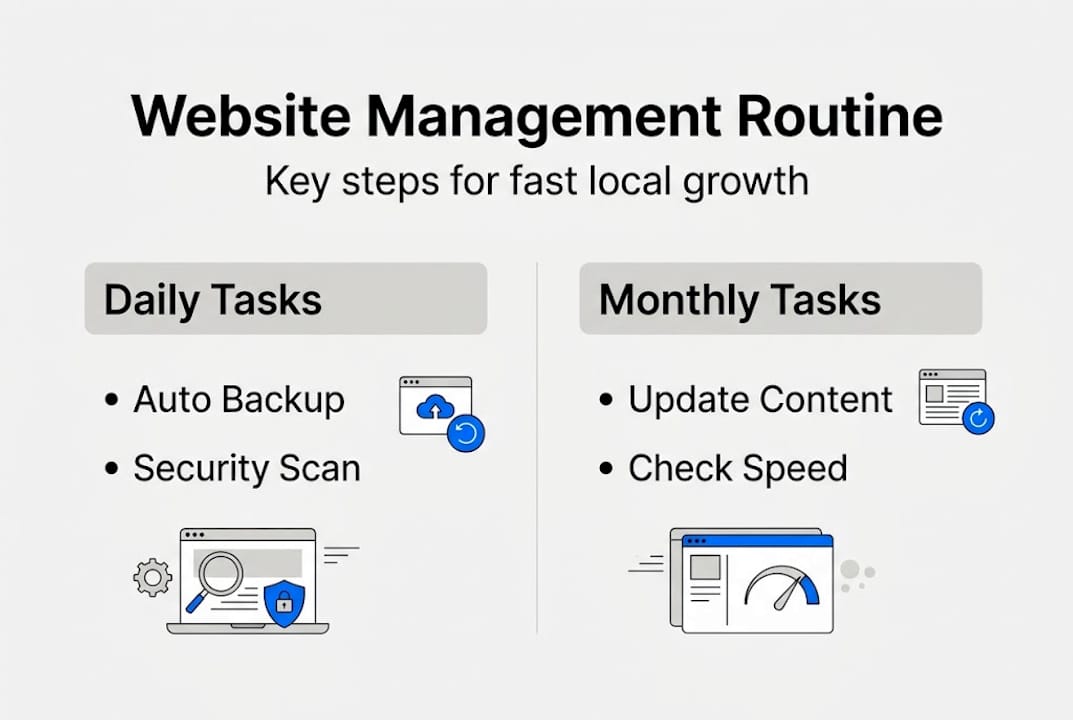
Here's a practical task schedule:
| Task | Frequency | Recommended tool | Responsibility |
|---|---|---|---|
| Automated backup | Daily | UpdraftPlus, Jetpack | Developer or plugin |
| Uptime monitoring | Continuous | UptimeRobot | Automated |
| Plugin/theme updates | Weekly | WP dashboard or staging | Developer |
| Core Web Vitals review | Monthly | Google Search Console | Owner or agency |
| Content review | Monthly | Manual or CMS | Owner |
Monitor your Core Web Vitals at least once a month. These are Google's metrics for page speed, visual stability, and interactivity. A drop in any of these can quietly push your rankings down before you notice.
How to run a basic monthly site check:
- Log into your hosting dashboard and confirm the last backup completed successfully.
- Check your uptime monitor for any downtime alerts from the past 30 days.
- Run a PageSpeed Insights test and compare scores to last month.
- Review your Core Web Vitals in Google Search Console for any flagged issues.
- Update any outdated plugins or themes on a staging site first, then push live.
Using communication and workflow tools can help you stay organized across these tasks, especially if you're coordinating with a developer or virtual assistant.
Pro Tip: Never update plugins or themes directly on your live site. Test everything on a staging environment first. One incompatible update can take your site offline and cost you leads for hours.
Managing advanced security and troubleshooting edge cases
Beyond daily routines, you need a plan for unexpected problems. Security threats and edge cases don't follow a schedule, and being unprepared can mean lost data, lost rankings, or worse.
Start with a Web Application Firewall, commonly called a WAF. Services like Cloudflare provide automatic protection against common attacks, bots, and traffic spikes without requiring you to manage it manually. For most small business sites, Cloudflare's free tier is a solid starting point. Pair this with your managed hosting solutions for layered protection.
Input validation is another area worth understanding. This means your site checks that form submissions, file uploads, and search inputs contain expected data. For example, if your contact form accepts file uploads, set a maximum file size limit. Without boundaries like this, bad actors can exploit open inputs.
47% of small businesses allocate zero cybersecurity budget, leaving them exposed to plugin conflicts, boundary input failures, high traffic spikes, and compatibility issues that can take a site offline without warning.
Knowing this, even basic protections put you ahead of nearly half your competition. Here are the most common edge cases to plan for:
- Plugin conflicts: Two plugins trying to control the same function can crash your site. Always check compatibility before installing.
- High traffic spikes: A local news mention or a promoted post can send sudden traffic. Make sure your hosting plan can handle bursts.
- Special input characters: Forms that accept text should handle symbols, emojis, and foreign characters without breaking.
- Outdated SSL certificates: An expired SSL shows a security warning to visitors and tanks trust immediately. Set a calendar reminder to renew.
- Broken redirects: After any site restructure, test all old URLs to confirm they redirect properly.
Pro Tip: If your site includes a payment form or booking system, test it with both standard and unusual inputs, like very long names, special characters, and maximum file sizes. These edge case tests catch problems before real customers do.
Integrating content management and local marketing for lead growth
Once security and core functions are solid, focus on continuous content updates and marketing integration for growth. A technically sound site that never changes won't rank well or convert visitors into leads.
Content freshness signals SEO value over static pages, and mobile UX improvements directly impact local rankings. Both of these are within your control and don't require a big budget.
How to build a content and local marketing rhythm:
- Update your service pages every quarter to reflect current offerings, pricing, and seasonal availability.
- Add location-specific phrases naturally throughout your content, such as "HVAC repair in Utica" or "landscaping services near Rome, NY."
- Connect your social media profiles to your website and keep them active. Google looks at your overall digital presence, not just your site.
- Add new customer testimonials every one to two months. Fresh social proof builds trust and adds keyword-rich content.
- Publish a short blog post or FAQ update monthly to target new search queries relevant to your service area.
For lead generation specifically, focus on these on-site elements:
- A prominent phone number in the header on every page
- A contact form that takes under 60 seconds to complete
- A Google Maps embed on your contact page
- Clear calls-to-action like "Get a free quote" or "Book a consultation" above the fold
- Updated testimonials from local customers, ideally mentioning your city or neighborhood
Our local SEO strategies page outlines how these elements work together to improve your visibility in Google's local pack. You can also see how this looks in practice by browsing our portfolio of Mohawk Valley business websites. For a deeper look at content management best practices, the fundamentals apply directly to local service businesses like yours.
What most guides miss: Local edge and real-world lessons
Most website management guides treat every business the same. They list tasks, recommend tools, and move on. What they miss is the trade-off reality that local service businesses actually face.
Self-managing your site saves money, but it demands consistent attention. One missed update or skipped backup can set you back weeks. Agencies offer full control but at high cost. Hybrid managed solutions balance reliability and affordability, which is why they tend to fit Mohawk Valley small businesses best.
Here's the real-world lesson most guides skip: small, consistent changes outperform big, sporadic overhauls. Updating a service page, improving a tap target, or adding one local testimonial every few weeks compounds over time. You don't need to rebuild your site to improve your rankings. You need to stay active.
We also see businesses hesitate to update their sites because they're afraid of breaking something. That fear is valid, but it leads to stagnation. The answer isn't to avoid updates. It's to use a staging environment and test before going live. That single habit removes most of the risk. Explore managed hosting advice to see how a managed setup can take that pressure off entirely.
Pro Tip: Focus your energy on the improvements that directly affect lead generation, like contact forms, local keywords, and mobile usability. Chasing every new SEO trend wastes time that's better spent on practical wins.
Take your custom website further with Designed by Anthony
Managing a custom website well takes time, knowledge, and consistency. If you're ready to stop guessing and start seeing real results, Designed by Anthony helps small businesses across the Mohawk Valley and Central New York build and maintain websites that actually generate leads.
Browse our website portfolio to see real examples of fast, mobile-friendly sites built for local service businesses just like yours. Our local SEO help packages are designed to improve your visibility in local search and bring more qualified visitors to your site. When you're ready to plan your budget, check our pricing and packages for transparent options that fit small business needs. We're here to make the process straightforward and the results measurable.
Frequently asked questions
How often should I back up my custom website?
Daily automated backups are best for most small business sites, with off-site storage added for an extra layer of security in case your hosting environment is compromised.
What are quick ways to improve mobile friendliness?
Set tap targets to at least 48 pixels wide and body font size to 16px or larger. These two adjustments make navigation easier and directly impact local rankings in mobile search results.
How do I handle plugin conflicts after software updates?
Always test updates on a staging site before pushing them live. If a conflict appears, roll back the update and check for a compatibility patch, since plugin conflicts post-updates are one of the most common causes of unexpected site errors.
Can regular content updates boost my site's local search ranking?
Yes. Fresh content signals SEO value to search engines and helps your site rank for relevant local keywords, especially when you include location-specific phrases tied to your service area.